


Migrating to Kit from ActiveCampaign
Once upon a time, when I first started my email list, I debated between Kit and ActiveCampaign.
Kit (formerly ConvertKit) was a serious contender, but ActiveCampaign won.
ActiveCampaign was just so so robust.
I felt like there was nothing I couldn’t do in ActiveCampaign.
And since the thought of migrating down the line sounded awful, I wanted to choose something that had capabilities that could handle me forever. (No, the irony is not lost on me.)
But the clincher that sold me on ActiveCampaign? A feature.
In ActiveCampaign, you can A/B test within automations. In Kit, you couldn’t.
And I love testing stuff.
Half the reason I even have an email list is to use my subscribers as a lab rat for things I’m considering trying on clients. (And yes, you too can be a lab rat, just by inputting your details in that teal box above!)
Plus, not being able to test something evergreen seemed like something I couldn’t manage without. Evergreen results are more significant – and what you do with the results can be so much more impactful too.
So, into ActiveCampaign I dove, head over heels in love with the platform.
I was in TOTAL honeymoon phase.
I gushed about ActiveCampaign to anyone who asked.
Until Strike One
We tried to redo our re-engagement flow, using their recipe for the technical set up.
And…
It didn’t work.
Disengaged subscribers weren’t getting the re-engagement emails. But muuuuch worse, engaged subscribers were!
It was a mess. We turned off the automation and contacted support.
Chat didn’t prove very helpful.
Hmmm.
I booked a 1:1 call – something it seems like they offer once per non-enterprise customer (don’t quote me on this, that’s what it seemed like). That would do the trick, right?
Nope… she had no clue what was wrong with the flow and… suggested I use their recipe. 🤦♀️
Ok, fine, no re-engagement flow. Not great – especially since I was kinda preaching about re-engagement flows at the time.
Looking good, Nikki, looking good.
That’s when honeymoon phase ended. When I realized that ActiveCampaign is a giant conglomerate and couldn’t give me the support I needed.
Fine, it’s okay, I could reach out to an ActiveCampaign specialist to see if we can figure it out instead, right?
Well, turns out, there aren’t a lot of ActiveCampaign specialists. All the ActiveCampaign specialists I knew aren’t ActiveCampaign specialists per se – they’re tech ppl, who also have a decent handle on ActiveCampaign.
Given that I knew 4 Kit specialists off the top of my head, this felt kind of meh.
But okay, tech people can do the job too.
Until I got a quote: 3000 buckaroos to fix my re-engagement flow (and a few other things I threw in that were NOT big fixes).
Um… I’d rather just not have a re-engagement flow. I’m not an e-comm store or giant brand that needs super duper deliverability.
The lightbulb moment
Having to pull together a list of small fixes that I wanted this 3K specialist to implement made me realize something:
Each of the fixes was something that I could actually do myself – or assign to my VA, Pesi – but for some reason… I didn’t.
Why?
The thought was always in the background, but now it was brought to the forefront: while ActiveCampaign is super robust, it’s also super unintuitive.
I started realizing that I hated going into ActiveCampaign. I always thought it was just that it was so so sloooooooooooooooowwwwwwwww, but no, it was also because everything took a thousand clicks and zoom-ins and things were labeled very similarly but unintuitively.
And because of this, I never went in to view results. Never updated automations. Never built new ones.
I half heartedly tried assigning these things to Pesi but 1) it’s not like she was raring to do it either and 2) I’d never get around to properly assigning exactly what I wanted because it meant going into the platform to get clarity on what I wanted.
So all those A/B tests that I was so excited about? They were doing nothing except exciting those of you who sign up with two email addresses to spy on my testing. (Who’s the lab rat here after all?)
The feature that won me over was basically useless.
Enter: the competition
Then I read a year in review from Nathan Barry, founder of Kit.
And this line jumped out: “We’re now the only mainstream email provider to allow video to play natively in emails.”
Cool.
But more than the actual feature (don’t worry, I’d learned my lesson by now: 1) most single features aren’t as valuable as you expect them to be and 2) competitors can copy features anytime!) – I was reassured by the direction that Kit is continuing to take.
Since that first bout of research when I was first choosing a platform, they’ve been serving “Creators.” That hasn’t changed over time – and they’ve really been giving it their all, in very creative ways.
My favorite example of this is their address feature:
CAN-SPAM requires every marketing email to include a physical mailing address. But most Creators work from home. And it’s a bit icky to share your home address on every email you send.
So Kit maintains a mailing address that all their customers can use – and they’ll scan in any mail you receive and send it your way. (No packages though, bummer.)
That’s the kind of “in the shoes of their target audience” kind of direction that has really been defining their direction.
Meanwhile, every new feature that ActiveCampaign was putting out was either for the CRM or for their ecommerce customers. Neither of which is relevant to me.
It was frustrating to be ignored – especially when I felt their UX needed serious improvement.
My churn journey
In short:
The why was because that account was a mess and that I was too scared to go in and look at it.
The push was seeing how Kit direction has stayed throughout the years – and how their product has evolved to serve that direction.
And the trigger was the upcoming renewal of my ActiveCampaign annual plan.
In long:
Churn doesn’t happen in a vacuum.
ActiveCampaign should have noticed that I stopped filling out NPS surveys. That alone should have been enough to trigger a retention campaign. (Wait till you see what happened when I canceled.)
And forget NPS, anytime you hope to keep customers with you for a long time (um, all of us?), periodic reach outs and nurtures can mitigate surprise churns that have actually been percolating under the surface for a while.
The migration process
I knew migration would be a big deal, so I went to my calendar to block out the month of October for us to tackle it.
And saw that both Pesi and I were taking vacation throughout the entire month.
Umm… guess we’ll tackle it in September? I didn’t love the idea of dedicating one month to non-client stuff and then also taking off a lot of time the next month, but what can you do?
And then I saw a Tweet from Jason Resnick promoting a half-rate day rate sale.
Cool, it’d be great to have some help to ease up the work at a very inconvenient time. And also, I figured he could give everything a look through, clean up the messy bits, and make sure we weren’t making any crazy mistakes.
So I reached out.
This is something I’ve gotten very passionate about – ever since buying a high ticket course to take "next year" and then not needing it the next year. As my sister says: If it’s gotta be now, it’s gotta be no.
And then, in July, I saw that Kit was running a promotion: switch by July 31st and you get a free audit. Plus, if you have 3,000 subscribers, they’ll migrate everything for you. Wowwwww.
The only problem? I don’t have 3,000 subscribers.
I reached out to support and asked if I could pay for the 3K plan, despite not having 3,000 actual subscribers.
No siree I couldn’t. The wowwww turned into a wahhhhh.
And then I got thinking… I thought I’d hire Jason for a day rate, thinking we’d handle the migration and he’d apply some band aids… but what if we had him do the migration completely?
So, I sent a query and… decided to hand it off completely.
I paid 4x what I would have if I’d jumped on the half-rate day rate. But I don’t regret the decision not to buy something I might not use.
(And tbh, I’m not sure if he would have done a migration in one day. The whole process was very white glove.)
So easy
Before starting, I had to clarify a little strategy stuff. Organize which automations were important, which weren’t. Stuff like that.
We had a kickoff call to hammer that out, along with timing and technical stuff.
And Jason did the rest.
Blisssssss.
I even went off the grid for 10 days while he did his magic.
And I came back to a wonderfully, beautiful migrated account.
Exposing the underside……….
It was a little vulnerable giving Jason access to everything – how many subscribers I have, how many products I’ve sold, all the numbers that quantify our “success.”
It was uncomfortable because I think I should have “more.” Cuz the big bro internet ppl say I should. But also because I think I definitely have more opportunity that I’m not tapping into.
And when I told him that, he actually outlined some strategies of how I could do that.
Wouldn’t it be great if I could have told him without feeling guilty or “not good enough” about it?
So, little pep talk to self: just cuz the gurus say you should doesn’t mean you should. And even if you think you should, doesn’t mean you have to beat yourself up about it.
Saying goodbye to ActiveCampaign
It was definitely kinda crazy to cancel ActiveCampaign.
There’s so much in there that I felt like I was leaving behind – but that was just emotional. Logically, I knew I had everything I needed in Kit or in CSV files.
The cancellation process wasn’t very impressive.
First, it took Pesi several minutes to find where to cancel. Not cool AC. Not cool.
Second, before processing the cancellation, they offered a 1:1 consult 🙄
Too little too late.
A customer shouldn’t have to wait till they’re frustrated – or jump through hoops – to get good support, sorry.
But, I will say that filling out the feedback survey was oddly satisfying. 😈
And they all lived happily ever after
I knew when I hired Jason that he’d set things up more strategically than we could – but he completely exceeded my expectations.
He implemented so many little things that I wasn’t expecting – things like naming conventions, suppression triggers, hidden fields – just the little stuff that you know makes a big difference when you’re deep in email tech for years.
Honestly, my takeaway from seeing how he set everything up is that anyone starting an email list should hire someone to set it up properly. It’s not a fun opinion – most everyone I know wants to start when they’re scrappy. But it saves sooooo much headache down the line.
But even more importantly: when you start with strategy, you can start monetizing faster, and better.
Case in point: I have so many products that are just not linked to each other. I’m sure you don’t know half the products that I sell because you’ve never been pitched on them. Starting with a strategy would have given you a proper customer journey.
Now I have the bare bones in place to make that happen. Prepare for a zillion pitches. JUST KIDDING.
The other side of switch
Honestly, I’m not in la la honeymoon land with Kit support – we had one tiny snag and Jason offered a better workaround than they did. I’m also still a little huffy about them not letting me up to the 3K plan to get the free migration.
But they’re way more responsive than the ActiveCampaign support – and they’re also more invested in making sure you’re happy and that we reach a satisfactory conclusion.
They’re just… nice.
I also know that there will definitely be a learning curve with Kit.
The last email I sent had super wide margins and the wrong sender name. (The margins took a day of support back and forth, still working on the sender name.)
I have to get used to the whole template editor thing – instead of just being able to edit the design directly while writing.
Things like that.
No tool is perfect, I’m not in la la land.
But so far so good.
And that, dear friend, is the end of the story.
Or maybe…… it’s just the beginning.
Yes, you may now cue the violins and sunsets. Or vomit. Depends how much you hate cliches.
P.S. A month or two before migrating, the Kit affiliate team reached out and asked if I wanted to be an affiliate. I jumped aboard and have been really impressed with how they treat their affiliates – they had a whole training course and sequence to greet me.
And why, yes, of course you can use my affiliate link to switch, my pleasure. :P
I’ll even give you a 30 minute consult, free, if you do. We can use it to develop your content strategy, brainstorm offers, plan your welcome sequence, or even to talk migration best practices.
Missed parts of the Considering Kit series? Here you go!

Your Kit* questions, answered! Part 6 of the Considering Kit series
*formerly ConvertKit
I’m surprised – this series garnered so few questions.
Do you really have no questions???
Well, by no questions, I mean aside from these:
You mentioned a strong naming convention. I’m a naming convention nerd. Tell me more.
We have two naming conventions we use in Kit: one for broadcasts, one for automations.
For Broadcasts, we do: Segment we’re sending to - Name of the email/topic - Date sent
Example: Podcast updates - Ep. 34 (Ness Labs) - 2.5.25
For Automations, we do: Funnel location - Automation Topic - Segment
Example: TOF - Customer Interview - GetUplift OR Post Launch - Email Mastery - WDYB
How hard is it to migrate?
I cheated and hired Jason Resnick to do the migration for me. You can read all about it here. Michal Eisik just migrated to Kit in-house while on maternity leave and said she didn’t have to lift a finger.
Are you sure Kit’s support is good? I reached out for a demo and they said they don’t do demos.
As a customer, their support is great. And while I totally get that it’s annoying not to be able to get the time of day before you join, I’m really grateful that they prioritize customer support tickets. It says a lot more about support quality (or lack thereof) when companies prioritize leads over customers.
And as far as a demo… I might have something up my sleeve for this. Email me if this sounds intriguing to you.
And, that ‘bout wraps up our Considering Kit series.
I’m still here if you have questions – just email me at admin@nikkielbaz.com.
But if you’re ready to make the switch to Kit - slash - start your list with Kit, here’s my affiliate link.
Don't forget: free consult to set up or improve your email list
Remember, you’ll get a coupon code for a free 30-minute consult ($500 value) – and you can use our time together to develop your content strategy… brainstorm offers… polish your welcome flow – or whatever else you need to hammer down your email marketing.
Thanks for tech-geeking with me – I had fun!
The links included are affiliate links and I’ll earn a commission if you purchase a plan. This costs you nothing extra, and you’ll earn a free strategy consult – woohoo!
Missed parts of the Considering Kit series? Here you go!

The Kit* features I hate or miss: Part 5 of the Considering Kit series
*formerly ConvertKit
This writeup? I am definitely not procrastinating this writeup.
It is so easy to harp on tech, am’iright?
Thankfully, the things that bother me about Kit aren’t deal breakers – and one is a one-time, quick fixes that I just haven’t prioritized. (Still, when you’re considering a new tool, it’s nice to know what comes standard out of the box, and what you need to fiddle with yourself.)
So here be the things I hate or miss while using Kit:
Inability to search Automations
I can sort alphabetically. I can sort chronologically. I can view as a list. I can view as icons. But I cannot search my 51 automations. Whyyyyyyyy?
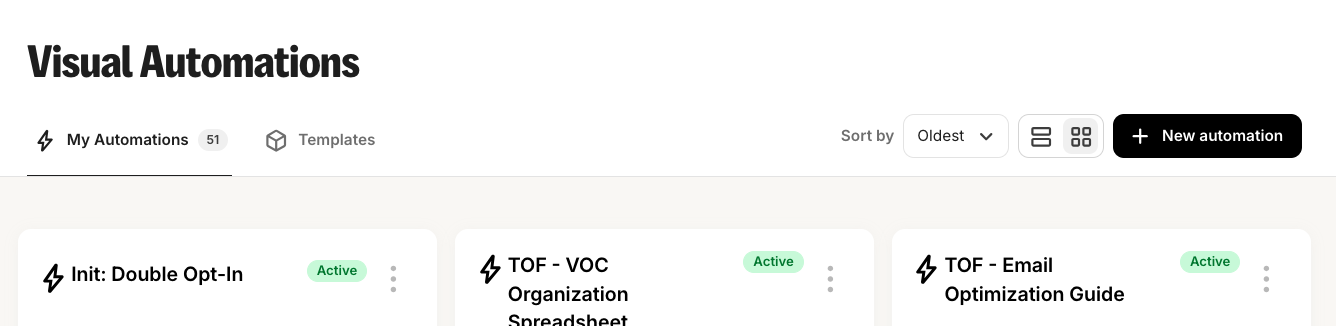
My workaround is a strong naming convention, courtesy of Jason Resnick, who did our migration. Also Command+F.
Inability to name Broadcasts (what Kit calls campaigns)
See the name of this Broadcast? It’s the subject line. Arrrrrrgh. Drives me nuts.
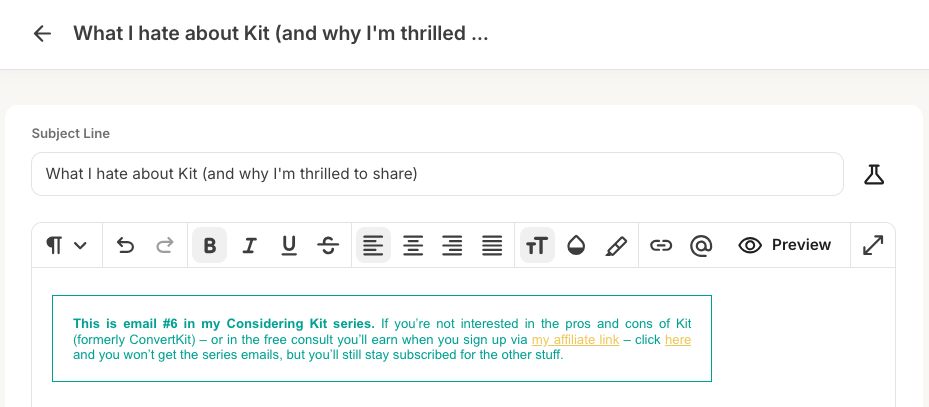
My workaround? You can add an ‘Internal note’ which is where we name them properly:
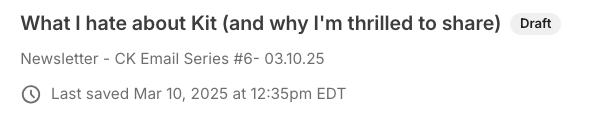
See how it shows up in small?
And at least Broadcasts are searchable:

Wow, have I only sent 78 campaigns?
One too many steps to send test email
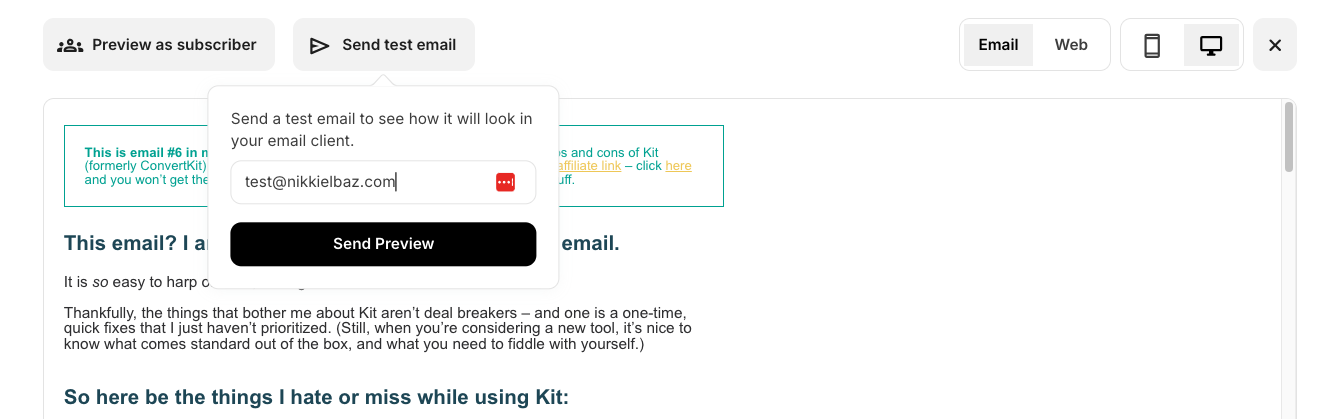
Only once you’re in the preview pane can you send a test email. It’s the only reason I go into the preview pane – I never feel the need to go in because it looks exactly the same as the editor. So much so, that I’m always trying to edit the email when I’m in the preview pane – and getting frustrated when it doesn’t work.
Thankfully, there are 2 prominent places that open the preview pane, so it’s not that annoying. It would just be so nice if I could hit “Send test email” instead of “Preview” and then “Send test email.”
Annoying link testing
This is actually a good feature, but I get annoyed at it anyway. When you test links, it doesn’t just direct you to the page – it sends you to a redirect page first.
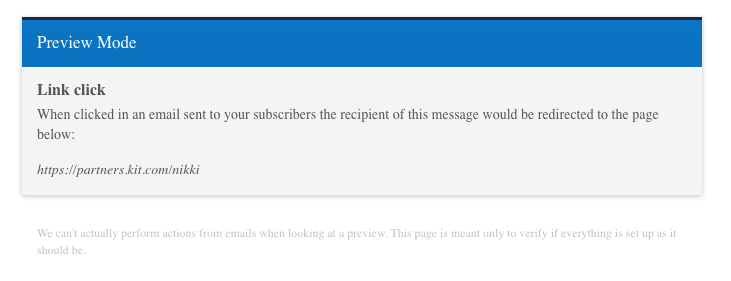
This is technically a better testing environment – plus it protects you from accidentally triggering automations or tags or whatnot that you set up as link triggers. Buuuut, I still find it annoying. I guess I find testing annoying.
Having to be super careful with Sequences
In Part 3, I raved that Kit bundles Sequences into Automations. The only flaw in this is that there’s no education around it. So the first time you use it, you have no idea anything is different and when you duplicate your automation, you assume the sequence duplicates too and you edit your sequence without a care in the world – and then wake up to an inbox full of confused subscribers who are getting the updated sequence that makes no sense in context of their automation.
You are now officially able to enjoy the benefits of Sequences because you will avoid its one flaw: no education on the fact that if you duplicate an Automation it doesn’t duplicate your Sequence.
(Note that the fact that it doesn’t duplicate is not the flaw – it can actually be useful. You just have to know how it works.)
Weird tracking and leading
I mentioned this in Part 3 too. The tracking and leading in my emails is a-w-f-u-l. This is the thing I need to prioritize. No one else I know using Kit has such ugly emails. I need to ask support for the code to fix this – but I also want to play around with templates.
Nitpicky: No triggering automations by time
If only, if only. Alas, no platform I know does this. Maybe Deadline Funnel or other launch-focused platforms. It would be soooo nice.
Questions?
Super. Read on for the Q+A.
(And if you’ve been using Kit and are like, “What? Nikki, you can totally search in automations,” PLEASE email me and gimme the deets.)
Don't forget: free consult to set up or improve your email list
Sign up for Kit with my affiliate link, you’ll get a coupon code for a free 30-minute consult ($500 value). Use our time together to develop your content strategy… brainstorm offers… polish your welcome flow – or whatever else you need to make your email list work for you.
The links included are affiliate links and I’ll earn a commission if you purchase a plan. This costs you nothing extra, and you’ll earn a free strategy consult – woohoo!
Missed parts of the Considering Kit series? Here you go!

The Kit* features I love (and why I don’t want to share them with you): Part 4 of the Considering Kit series
*formerly ConvertKit
I’ll be honest: I majorly procrastinated writing this part of the Considering Kit series.
Kit is a tool I love, and this writeup is about what I love about it.
So why the procrastination?
Because I’m an affiliate. Which means that, while, yes, I ultimately want you to choose the best tool for your needs, I think Kit is the best tool for your needs. (Unless you’re not a Creator. You read Part #2, right?)
So I want you to read this feature list and be wowed.
But most of what I love about Kit feels so… unimpressive.
I even asked ChatGPT and Perplexity what users love about Kit and, yeah. The stuff they listed are things that should be a no-brainer for an email platform.
- It should be basic that UX not feel like navigating a hedge maze.
- It should be basic that loading automations not feel like watching paint dry.
- It should be basic that chatting support not feel like climbing an Escher staircase.
The problem though… is that these things are not basic at all.
If you’re frustrated with your current platform, you know this. If you haven’t started your list yet, well, now you know it too. It is absolutely astounding how ridiculously clunky most email platforms are.
So… I will silence the procrastination voice and proceed.
Here’s what I love about Kit:
It’s intuitive
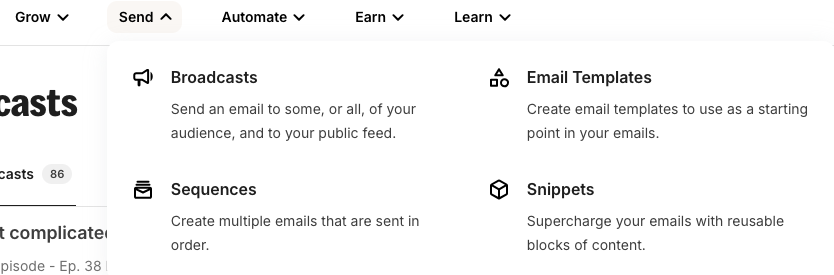
Everything makes sense. Things are clean and organized. Elements are where you expect them to be. And it’s really easy to see everything at a glance – be it the dashboard or your giant 70-step automation.
Even just the navigation menus are broken down really well.
It’s fast
My biggest pain point when I was using ActiveCampaign was how slow it was. It was sooooooooo annoying to use. Not to mention how wasteful it felt to pay my VA to watch things load. Speed is absolutely not an issue with Kit, no matter how big your automation is. (Partly because of their clever Sequences feature. Which brings me to:)
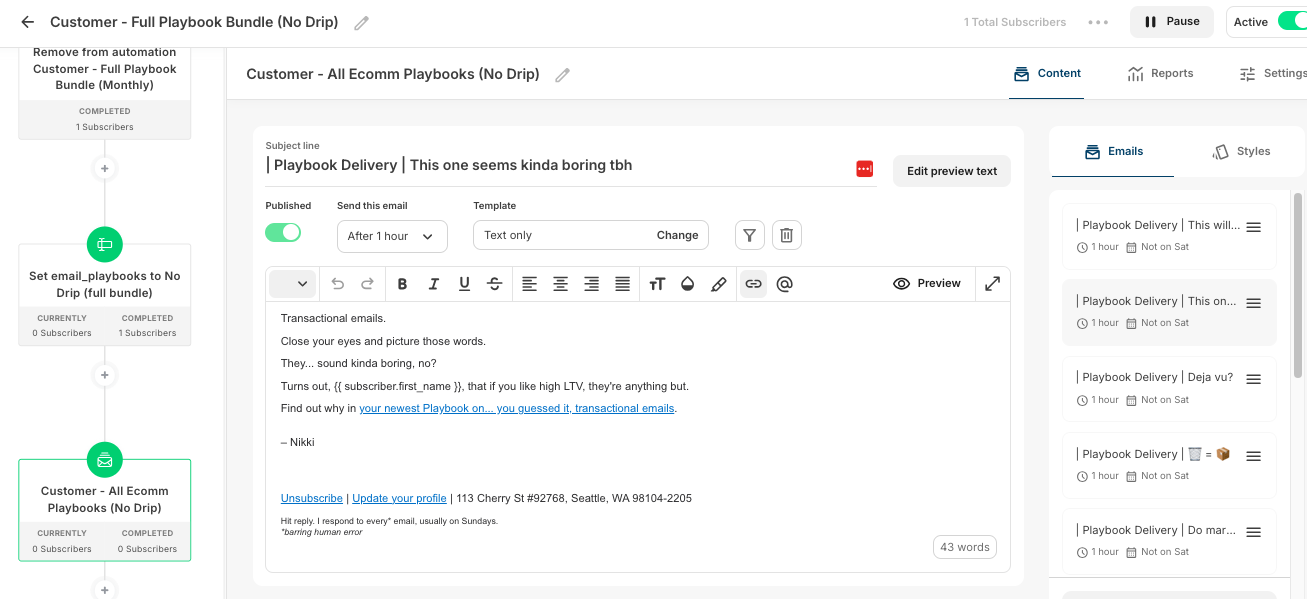
Tightly packed Automations
This is a super interesting way of approaching automations that is really helpful at keeping things lightweight and “see it at a glance.”
Every step in the automaton is packed up – you click into it to see more details. This is fairly typical for things like tags, but for filters it’s less expected – and for the actual emails within the automation it’s definitely different. Kit totally separates Sequences (the emails) from the Automations (all the automated stuff in the flow, including tags or triggers, etc.)
🤖 Kit MCP
If you're anything like me, you live in Cowork – wishing the Chrome extension would just get more done without asking for approval every 30 seconds (or hitting yet another bug). Having Kit connected directly via MCP is that game changer.
If you aren't using Cowork / Codex / your agent of choice, you're clicking around your dashboard to get reports. The MCP skips all of that.
Instead, you can do all this – just by asking:
- Reporting + Analysis: Get summaries on automation metrics, collate highest performing recommendations – you can even ask for A/B test recommendations.
- Cleanup: If you've got 201 tags like… someone I know (don't judge), your agent can audit them – and then tidy up!
- Technical setup: Finally skip the click-click-click of building flows – or even campaigns. Just give your agent your finished draft and voila! Live – without any tedium.
How it stacks up against other ESPs:
| Platform | MCP support | Notes |
|---|---|---|
| Kit | ✅ Yes | Native MCP server — just launched |
| ActiveCampaign | ❌ No | API-only |
| Mailchimp | ❌ No | API-only |
| Beehiiv | ❌ No | API-only |
| Substack | ❌ No | No public API to speak of, let alone an MCP |
This is the kind of move that fits everything I said in Part 2 about Kit having their finger on the Creator pulse. Other ESPs are still requiring old-school APIs that most creators can't be bothered to bolt on (and frankly, shouldn't have to — we have businesses to run). Meanwhile, Kit shipped an easy connection that doesn't require an IT team, or any team at all.
Get all the details on Kit MCP here.
Rules/Link Triggers
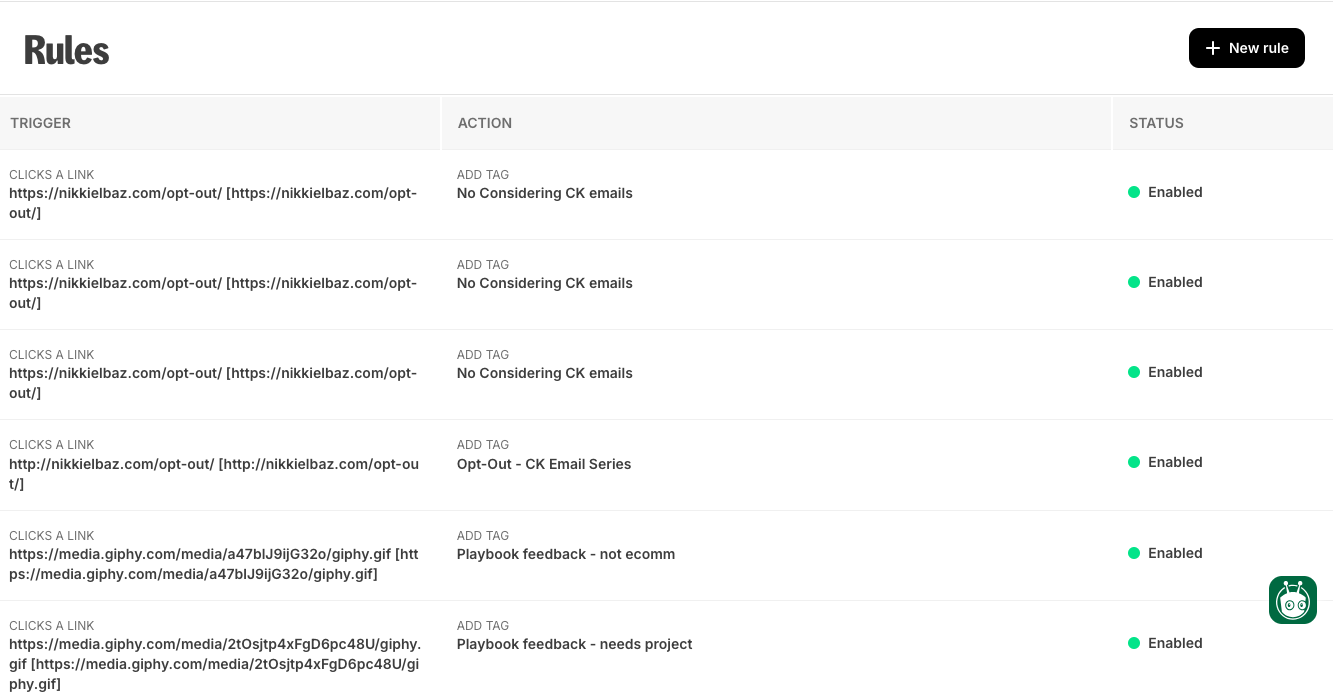
This is a little luxury feature that I really like: a link library that triggers subscriber tags. Yes, you can trigger tags easily enough while you’re building your campaign or automation, but it’s really nice to be able to prep things in advance. Especially for big launches with multiple segments – my VA can start setting up opt-outs or other triggers before I even start on the emails.
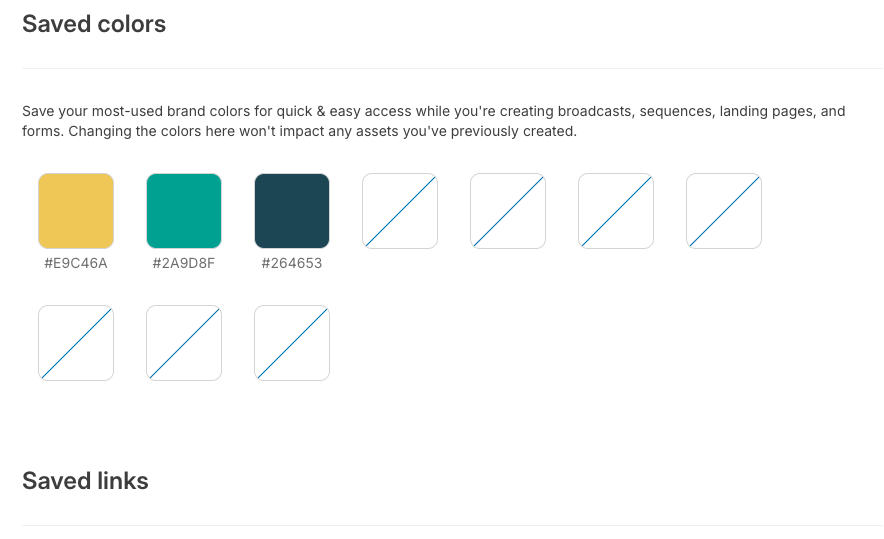
Saved Colors
This is such a time saver. Again, a bit luxurious, because we often just duplicate previous emails, so we have the colors already inputted. But for when we aren’t duplicating emails, it’s great not having to dig up the Slack thread with our brand colors to copy-paste in the HEX codes.
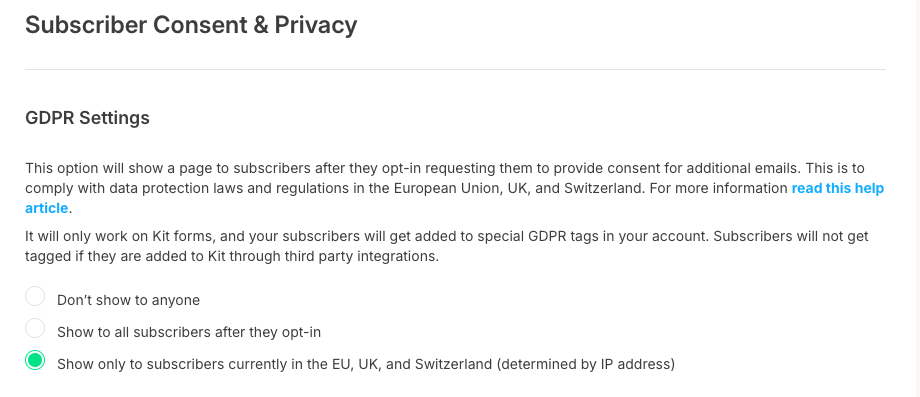
EU-specific GDPR settings
I don’t often think about this feature because it’s a set it and forget it kind of thing, but I love how you can get granular about who gets double opt-in.
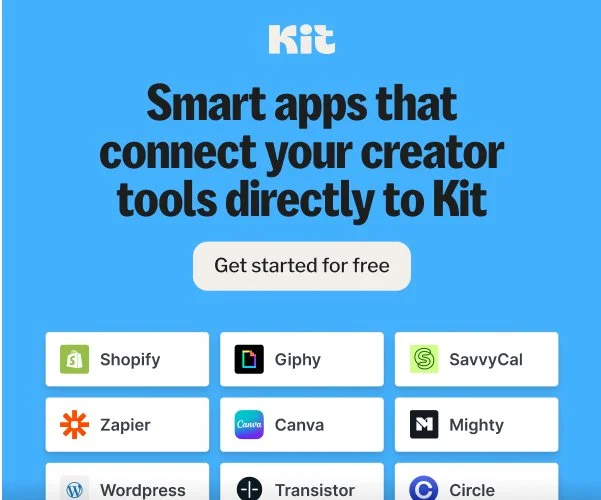
The Kit App Store
First up, because it’s a brand new feature! No more getting pulled into the Giphy black hole -- just open the inline library and embed that typing cat GIF. No more downloading and uploading Canva images -- just open your native media library and find the design you made 2 weeks ago. And if you've ever experienced the hair pulling adventure of attempting to add an Add to Calendar button into an email, you'll be stoked about the SaavyCal integration -- just add your webinar link and voila!
With everything directly integrated into emails from the apps in the Kit App Store, things are just way less clunky. Super exciting, no?
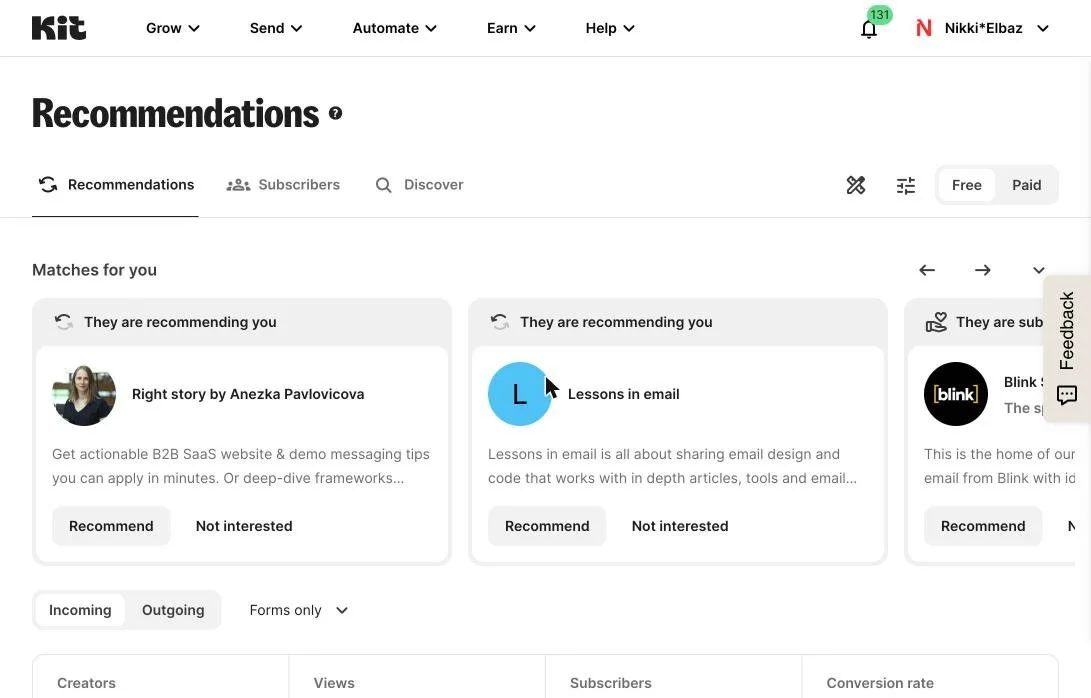
The Creator Network
When people opt in to your list, it pops open a lightbox with other email lists you recommend. And whoever you recommend gets prompted to recommend you too. Just a nice list growth opportunity. Not sure how effective it will be with a niched list at my size, but every little bit counts, right?
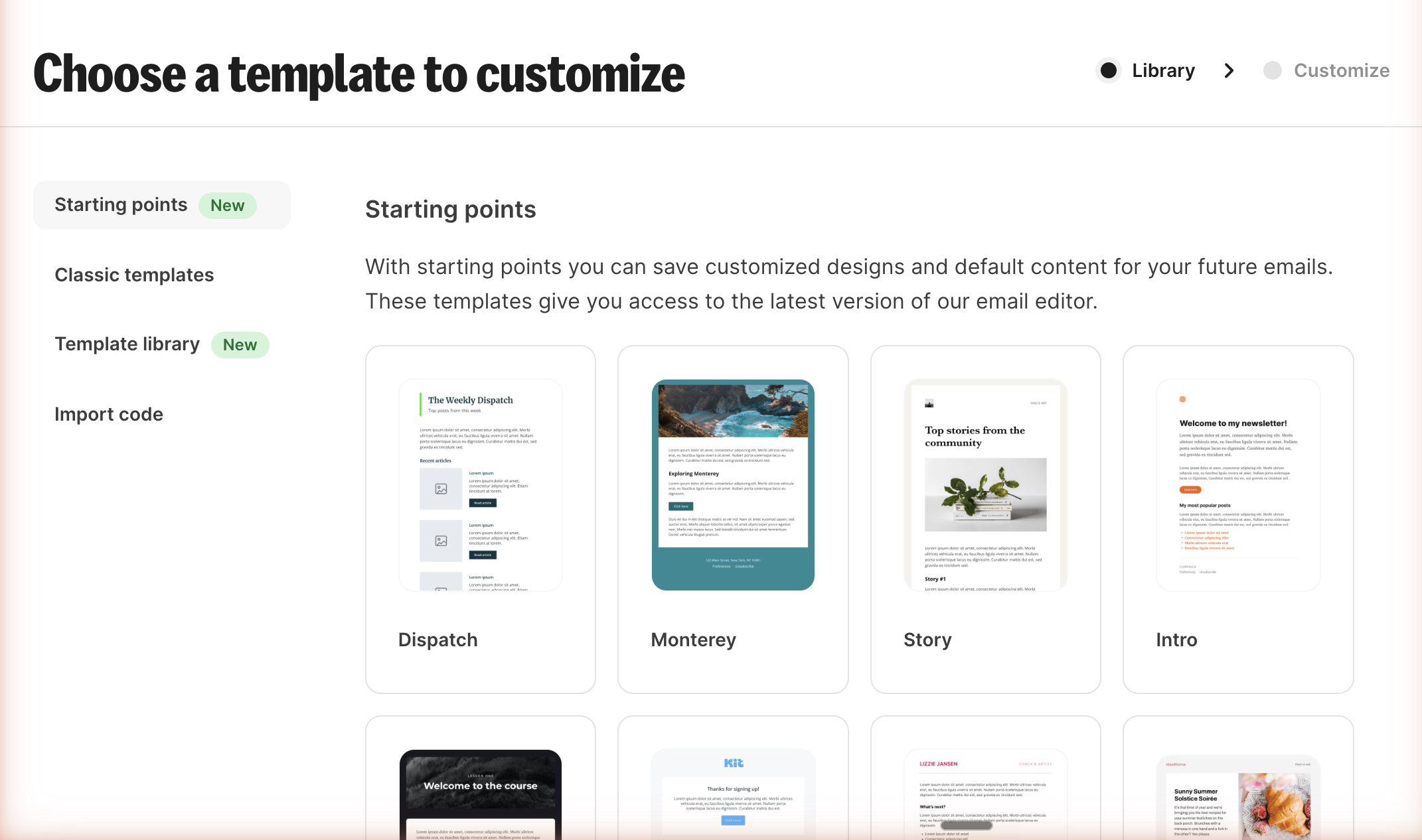
Templates
I despise the way my emails are formatted. I find them impossible to read – and I’ve even had subscribers tell me this (!). I definitely need to prioritize fixing this – and I’ve been hearing again and again how the Kit templates are really nice, even out of the box.
Plus, I’ve been tempted to experiment with designed emails. I know, shocking! Plain text is obviously very personal, but sometimes a little color adds fun – and clarity.
Liquid conditional content
I experimented with this once, it didn’t work, and our timeline was too tight to work it out, but it is so so cool and I should definitely try again. You can customize what content your subscribers see, based on their tags or custom fields. So, for example:
I first wrote up this post as an email series. And I put this blurb at the end the first email in this series. I could have cleaned up all the IF you did this THEN this, IF you did this THEN that – and only shown it to those who opted out.

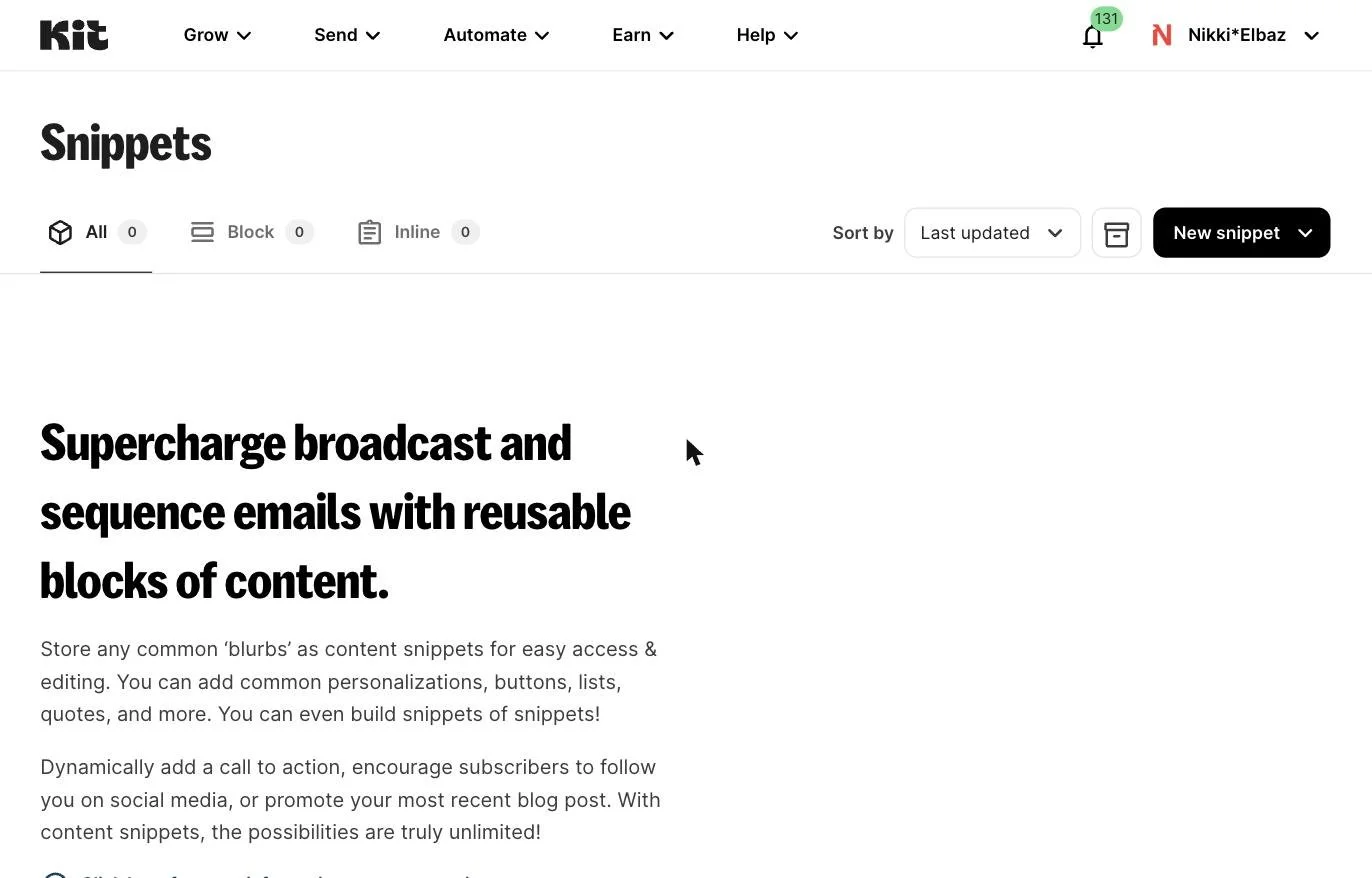
Snippets
This is something I just discovered when taking all the screenshots for this post and I’m excited to set it up. If you have things you promote or include frequently, you can create a snippet for it, and easily add it into your various emails. I’m planning on using it for the opt-out blurb on my podcast emails. It could also be useful pre-launch when you’re promoting a waitlist or pre-order. And it could be a nice way to play with your signature without having to change your template.
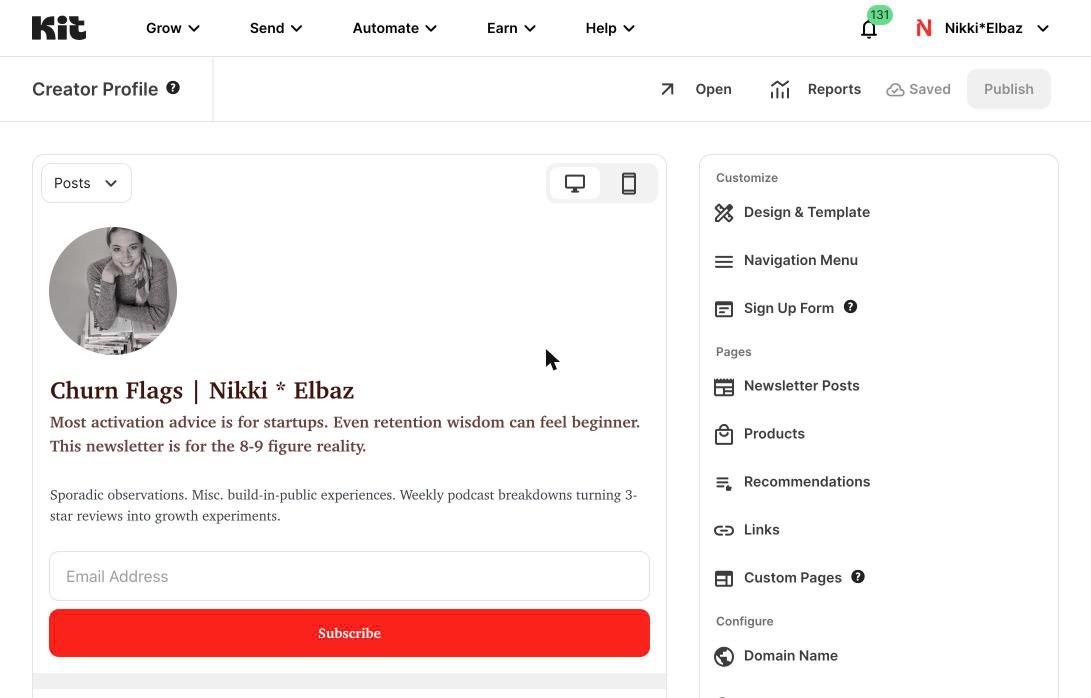
Link in Bio page
Here’s another thing I discovered while screenshotting features for this email. You can make a super functional link-in-bio page with Kit. The capabilities are way more robust (you can embed video, your Insta feed, etc.), you don’t have to pay another platform to access full features – and best of all, you can include an email signup form!
Don't forget: free consult to set up or improve your email list
Sign up for Kit with my affiliate link, you’ll get a coupon code for a free 30-minute consult ($500 value). Use our time together to develop your content strategy… brainstorm offers… polish your welcome flow – or whatever else you need to make your email list work for you.
The links included are affiliate links and I’ll earn a commission if you purchase a plan. This costs you nothing extra, and you’ll earn a free strategy consult – woohoo!
Missed parts of the Considering Kit series? Here you go!

ConvertKit Had Bad Support — Here’s Why I Recommend Them Anyway: Part 3 of the Considering Kit series
If you cancelled ConvertKit back in 2016, you were in for a nasty surprise. Users back in the day took to Reddit, Twitter, and Slack groups, complaining about the multi-step cancellation processes, strict no-refund policy, slow response times – and even charges post-cancellation.
Tagline shmagline – you could say you’re “for Creators” all you want, but if you’re taking to black hat business practices, you aren’t exactly living up to your promise.
So why in the world did I feel confident switching to Kit – or becoming an affiliate and risking my reputation by recommending them?
Four reasons:
#1: The old complaints? Mostly refund-related — and kind of expected.
The complaints that I saw back in the height of the bad press were all about the strict no-refund policy. I’d seen a handful of peers complaining that they’d purchased an annual plan, cancelled mid-way through the year, and were refused a pro-rated refund.
Honestly, I was surprised at those complaints. Isn’t that the whole point of annual plan discounts? And why companies offer monthly plans?
So I was able to approach my considerations with an emotional grain of salt, even when I saw much worse complaints when researching their support quality.
#2: I’ve worked with startups. These were growing pains, not red flags.
Having worked with a number of start ups, I’m familiar with these kinds of growing pains. Because, yes, that’s exactly what they were. One startup I worked with was run by the most meticulously honest guy – and yet he implemented a not-customer-focused practice when he added a self-serve tier. He needed the cash flow, everyone else was doing it, everything followed the letter of the law… it was hard not to fall prey to rationalization, even though it didn’t fit his usual operating ethos.
Nathan Barry, Kit’s founder, has been building in public since its inception, and has always seemed genuinely interested in serving his customers.
#3: I care more about how a company responds than whether they mess up.
To that end, I’m not out to find vendors who never make mistakes, but instead those who own up to mistakes.
I once hired a subcontractor who dropped off the planet halfway through the project. She actually had a good excuse – but she didn’t tell me what happened, nor was she apologetic. Contrast that with a subcontractor who I hired multiple times who wasn’t perfect about deadlines, but had an innate sense of commitment and responsibility – and worked to fix things when she messed up.
By 2018, Kit dropped the cancellation hoops, sped up support times, and were super upfront about their policies. Sure, you can say they just didn’t like the bad press, but there are tens of thousands of businesses who retain their black hat practices despite all the social venting – because, yes, you actually can get away with it.
#4: I tested them myself — and support today is actually great.
So, that was pre-joining.
Once I joined, I saw that I made the right calculations. The live agents are responsive – and seem genuinely interested in being helpful. More importantly, they feel a sense of responsibility to bring each ticket to an actual resolution. Sadly, that hasn’t been my experience with a whole bunch of other tech.
Whew, okay. That wraps up this post.
Now the post you’ve been waiting for: Features I love about Kit.
Don't forget: free consult to set up or improve your email list
Sign up for Kit with my affiliate link, you’ll get a coupon code for a free 30-minute consult ($500 value). Use our time together to develop your content strategy… brainstorm offers… polish your welcome flow – or whatever else you need to make your email list work for you.
The links included are affiliate links and I’ll earn a commission if you purchase a plan. This costs you nothing extra, and you’ll earn a free strategy consult – woohoo!
Missed parts of the Considering Kit series? Here you go!

Why I migrated to Kit*: Part 2 of the Considering Kit series
*formerly ConvertKit
Pop quiz: What are a few ways in which Creators stand apart from other business owners?
(Creators is how Kit defines their target audience. Creators include bloggers, podcasters, course creators, i.e. people whose business – or part of their business – is their audience.)
Here’re the first 5 stand-apart ways that I came up with.
Before you look at my list, hit reply and jot down the first 5 you come up with.
No seriously. Pause for a sec and come up with 5.

Ok, now on to mine:
Creators…
… work alone, or with small, remote teams
… sell digital products
… share a lot of content
… sell to people doing the same work they do
… have flexible (or overtime, if we’re being honest!) schedules
For creators, by creators
Kit’s tagline is “the only marketing platform built for creators, by creators” and I’ve seen time and again how they actually live up to it.
So many of their product updates are not just improvements in functionality or UX – they’re creative add-ons or features that are exactly beneficial for the creators lifestyle (workstyle?). They think deeply about each of these Creator charactaristics (and more that I haven’t thought of) and create features that serve or solve for them.
Here are a few examples:
📫 Physical Address Alternative
(a solve for “work alone, or with small, remote teams”)
CAN-SPAM – and the legal requirements in many other countries aside from the US – requires you to have a physical mailing address at the bottom of marketing emails. A huge majority of creators work from home (or the local coffee shop) and aren’t thrilled about sharing their personal details with anyone who fills out their opt-in form.
Kit’s solution? They set up a mailing address for their customers to use – and they man the address and scan and email PDFs of any letters that come through. Such a simple feature – but one that’s incredibly beneficial.
🛍 Commerce
(a solve for “sell digital products”)
Creators create things, right? So instead of having to link cart pages, host digital downloads, and tag customers, they created a Commerce product so Creators can sell their stuff directly in Kit.
(I can’t speak to this feature much because I don’t think the convenience gained would be woth the cost of migrating everything I had set up before switching to Kit. But I can still appreciate the feature, because it too shows how the team prioritizes features that solve for Creator needs.)
Do you use the Commerce feature? I’d love to hear what your experience has been like. Did you consider Commerce and decide to go with the conventional workarounds? I’d love to hear why you chose that option.
Domain verification
(a solve for “work alone, or with small, remote teams” and “have overtime schedules”)
Remember when Google announced those anti-spam sending requirements? That wasn’t fun. I know verifying my sender domain was a task that I kept putting at the END of my to do list. Well, until I got an email from Kit telling me that they partnered with this software that would do the job in a few clicks. Instead of slapping up a few help docs for an IT team to follow, they had their finger on the Creator-pulse, and they make this daunting tech task really easy.
Creator Network
(a solve for “sell to people doing the same work they do” and “share a lot of content”)
List growth is so different for Creators. Ecomm brands grow their list via browsing site visitors. SaaS brands grow their list via trial users. Creators build… from social or word of mouth.
And instead of peers being competitors, they’re potential customers. So a network driven list growth tool is the perfect solve. Again, finger on the pulse. Prioritizing the things that matter.
Does Kit check the boxes?
So, let’s wrap up today’s post with how they fit my Tech Choosing checklist:
#1: Customer base — Check, they serve Creators like me
#2: Customer Centricity — Check, they’re prioritizing the features that make a difference for my workflows and needs (more on this in the Support email)
#3: Agility — Check, they’re constantly adding new, Creator-focused features
#4: Overall UX — Check, their UX is simple and intuitive (more on this in the Features I Love email)
Bonus: Creativity — Check, because they’re so bent on serving Creators, they brainstorm creative solutions that other email platforms aren’t thinking about.
Next up, let’s talk about the elephant in the room: Kit’s support
Don't forget: free consult to set up or improve your email list
Sign up for Kit with my affiliate link, you’ll get a coupon code for a free 30-minute consult ($500 value). Use our time together to develop your content strategy… brainstorm offers… polish your welcome flow – or whatever else you need to make your email list work for you.
The links included are affiliate links and I’ll earn a commission if you purchase a plan. This costs you nothing extra, and you’ll earn a free strategy consult – woohoo!
Missed parts of the Considering Kit series? Here you go!

A guide to choosing SaaS (and how it affects your choice of email sending platform): Part 1 of the Considering Kit series
The rap-guide for choosing tech tools
🎧 Cue beat, cue strobe light
When choosin’ a SaaS
You gotta ask
Not ‘bouts the set of features
But ‘bouts the guidin’ ethos
Sounds fluffy?
Don't get huffy.
The reason and rhyme:
They’ll serve ya better over time
Ok, so clearly I have no future as a rapper.
But I do have a present as a copywriter, and the #1 rule when writing for tech that sits in a saturated industry is this: Find a differentiator
At first I thought this was just a marketing stunt – a matter of semantics if you will. But as time goes on, I see (over and over again) that it’s not.
(And this rule hasn’t just served my clients well – by them being able to attract better fit customers, it’s served me well too – by helping me find the right SaaS vendors that’ll do the best job for my needs.)
See, features are always changing – every SaaS has a feature log that plays catch up with the other guys.
So unless a feature is make it or break it, a feature shouldn’t be the reason you choose to go with one vendor over another.
(And even if said feature is make it or break it, it’s worth asking if it’s in the works and when it’ll be implemented.)
So. If you shouldn’t look at features, what should you look at?
Behold, my Tech Choosing Checklist:
#1: Customer base
Who do they serve? Who’s their primary set of customers? Do you fit into that profile? Will the features they prioritize – to serve that primary set of customers you defined – benefit you?
#2: Customer Centricity
Do they listen to customers’ feature requests? Do they add features that best support that primary audience? What’s their support like? Cuz it doesn’t matter who they serve if they’re not actually serving them.
#3: Agility
Check out their change log. Are they adding new features quickly? Are they adding new features too quickly and sacrificing their overall vision (or product quality)?
#4: Overall UX
Big UX overhauls are rare. If you can’t stand the overall feel and navigation, find someone else.
Bonus: Creativity
Are any new features stand-out? Do they tackle problems with curiosity? Is there a unique angle they apply to even the “standard” feature set that everyone else has?
The disruptors obviously have creativity down, but consider that the ones who come after have a leg up.
(A quick example: I was introduced to Paperform at the time when every other new SaaS was a survey builder. Yet their approach showed me that while they’d stay on par with Typeform, they wouldn’t just be Typeform wannabes. And I’m still seeing this hold true with each feature release.)
Sure, things can change, even after you’ve checked off these 4-5 boxes.
One of my favorite products has a completely different team than when I first joined.
And one of the main reasons I switched from ActiveCampaign to Kit is that ActiveCampaign shifted from serving SMBs to serving ecomm brands.
But still, this checklist will typically stand you in good stead.
So, next up: How Kit checked off those 5 boxes of my Tech Choosing Checklist.
Don't forget: free consult to set up or improve your email list
Sign up for Kit with my affiliate link, you’ll get a coupon code for a free 30-minute consult ($500 value). Use our time together to develop your content strategy… brainstorm offers… polish your welcome flow – or whatever else you need to make your email list work for you.
The links included are affiliate links and I’ll earn a commission if you purchase a plan. This costs you nothing extra, and you’ll earn a free strategy consult – woohoo!
Looking for the full Considering Kit series? Here you go!